
From Cold to Hot: Using Lead Scoring
From Cold to Hot: Using Lead Scoring to Prioritize Sales Outreach
Introduction
Imagine you’re on a basketball team. You have ten players, but only three can go into the game. You need to pick the best players—those who are warmed up, understand the play, and are ready to win. In the world of sales and marketing, your “players” are leads (potential customers).
Some are warmed up and ready for a conversation. Others are just sitting on the bench, not ready yet. The key is: Don’t send all your leads into the game. Instead, send the ones who are ready to win.
That’s where lead scoring comes in. It’s your system to turn cold leads (ice-cold) into hot leads (ready to buy), and then route them to your sales team at exactly the right moment. You waste less time. You focus on the winners.
In this blog, we’ll walk you through:
Why this matters (the pain of chasing low-quality leads)
What lead scoring is (in simple terms)
How to set it up (features like custom fields, workflows, assigning leads)
How it saves time and improves results for your team
Practical steps for you (as a marketing agency working with small business owners) to implement it
Everything will be written in a friendly, easy-to-understand style (5th-grade level), so you can send this to your audience or use it for your content marketing.
The Problem: Sales Teams Waste Time on Low-Quality Leads
Running a small business means your time is too valuable to waste chasing cold leads. Lead scoring helps you focus on the people who are most likely to buy—so you can spend less time guessing and more time closing deals.
By setting clear scoring rules and using automation to route the best leads to your sales team, you’ll turn your CRM into a powerful growth tool instead of just a contact list.
Let’s start with the pain point.
What’s going on?
Your and/or your sales team is busy. They get leads every day from submitted forms, website clicks, social media comments, and chatbots.
But many of those leads are not ready. They might just be browsing, comparing, or even spamming.
The sales rep calls them. The prospect doesn’t answer. Or they say “not at this time,” or “just exploring.” That’s time wasted.
Meanwhile, a few leads are ready: they have budget, urgency, and are looking for a solution now. But those get buried in the stack.
The result: low conversion rate, frustration sets in, and wasted effort.
Why is this so common?
Because marketing hands over all leads to sales without a filter.
Because there’s no system to tell who’s ready vs. not ready.
Because the definitions are fuzzy: what does “quality lead” mean?
Because small business owners and sales teams often don’t have large budgets or resources—they need things to work smarter, not harder.
A common complaint we often hear when we first talk to a business owner is, “We’re getting leads, but so few convert.”
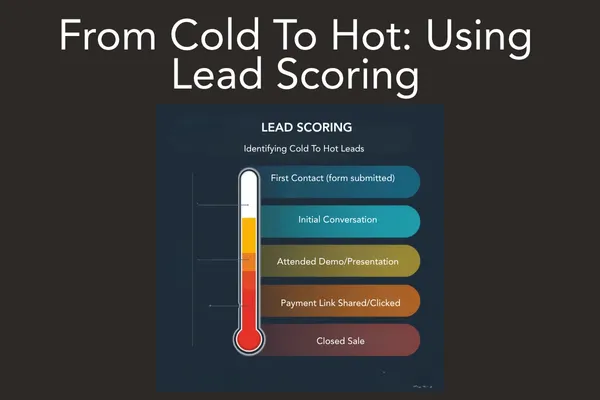
Taking The Temperature:
Configure Lead Scoring Rules to Rank Contacts and Automate Routing
Now the good news. There is a better way. You can rank contacts based on their activity within the CRM. Did they visit your website? 5 Points
Did they submit a contact form? 7 Points
Schedule a call? 10 Points
Based on their lead score you then you can automate routing: pass the hot leads to the sales rep immediately, send warm or cold leads into targeted nurturing workflows.
Let’s break down the key pieces.
What is lead scoring?
In simple terms: you assign a number (a score) to each lead, based on how likely they are to buy. The higher the score, the “hotter” the lead. The lower the score, the “colder.”
Leads that match your ideal customer profile (fit) get extra points.
Leads that show actions of interest (visited pricing page, downloaded eBook, requested demo) get extra points.
Leads that show negative signals (no interaction, out-of-geography, unsubscribed) might lose points. Sources say lead scoring helps companies figure out “which leads have the highest chance to convert” and “focus their resources on them.”
According to Oracle article, lead scoring also, improves productivity of sales teams and aligns marketing and sales around a shared definition of quality leads.
Automatically Identify high‐value actions and traits & assign point values
Next: look at what leads do when they are likely to convert. Examples:
Visiting the pricing or features page on your site. (Behavior)
Downloading a white-paper or eBook.
Requesting a demo or booking a call.
Opening emails and clicking links.
Engaging in chat or messaging.
Visit your pricing page or click on a payment link.
You can organize and rank your contacts, companies, and deals inside your CRM by creating your own lead scoring system and automatically move them within a sales pipeline based on their score. Each score gives a point value to a lead, showing how close they might be to becoming a paying customer or closing a deal. As the system runs, it checks each record against your chosen criteria and updates the score automatically based on those results.
You’ll have a threshold. For instance: score 50+ = hot lead. Score 20-49 = warm. Below 20 = cold/not yet. You can define group limits and overall limits for scoring.
Why is this the fix?
Because instead of “everyone gets a call,” you say:
Lead score above X → go to sales rep now.
Lead score between Y and X → nurturing sequence.
Lead score below Y → probably not right now, maybe drip campaign.
That means your sales team only spends time on high‐value leads. You’re being efficient.
Book a call with us here at Real Leads Finder Pro. We'd love to talk to you about your business and offer up some marketing tips too!
Having The Right Tools In Place
When using Real Leads Finder Pro systems, all of the elements for effective lead scoring, follow up and engagement are already there.
Lead Scoring: ability to assign and track numeric or grade‐based scores.
Custom Fields: fields like “Company size,” “Budget,” “Role,” “Geography,” “Last website visit,” etc. These allow you to capture fit and behavior.
Workflows / Automation: rules that say “if score > 75 then assign to Sales Rep A” OR “if score drops below 20 then send to Nurture Sequence.”
Routing / Alerts: automatically assign lead to rep or send a notification (SMS, email) so action is immediate.
Integration: ensures your forms, chatbots, website, email, SMS feed data into the CRM so scoring is updated in real time.
With those features working together, you automate the triage process. Sales reps get only the best leads. Marketing can nurture the rest.
Key Terms and Simple Definitions
Lead: A person or business that has shown interest in your product or service.
Lead scoring: Giving a number (points) to each lead based on how likely they are to buy.
Hot lead: A lead with a high score who is ready for a sales call.
Warm lead: A lead showing interest, but not quite ready to buy yet.
Cold lead: A lead who is not ready now; needs nurturing or time.
Custom fields: Special questions you add to your web form or CRM to capture important info (budget, location, role).
Workflow: A set of automated steps that happen when a condition is met (for example: if a lead score >50 then connect to specific marketing campaign or assign to a sales rep.).
Routing: The process of sending the lead to the right person (sales rep) or group, based on rules.
Negative scoring: Subtracting points when a lead shows signs of not buying (e.g., outside service area).
Threshold: The score number where you decide “this lead is hot and must be passed to sales now.”
Frequently Asked Questions (and Simple Answers)
Q: What is lead scoring:
A: It’s simply identifying prospects that are further along the sales cycle so you spend more time on the leads most likely to buy based on their level of activity.
Q: Will lead scoring replace our salespeople?
A: No—we’re not replacing humans. We’re helping humans focus where it matters. Scoring makes them more effective.
Q: What if we make mistakes assigning points?
A: It’s okay. You start simple and refine over time. The key is to track results and adjust.
Q: How often should we review and update our scoring model?
A: Monthly to quarterly review is a good rhythm. More frequent if your business changes fast.
Q: Can we use lead scoring for different services or segments?
A: Yes. You can build different scoring models for different products or client types (for example “large enterprise” vs “small business”).
Final Thoughts
Lead scoring is not fancy—it’s smart. It’s simply identifying prospects that are further along the sales cycle so you spend more time on the leads most likely to buy. When you use it right, you transform your sales outreach from blasting everyone to targeted high-impact action.
Lead scoring isn’t just for big corporations — it’s a game-changer for small business owners too. When you use the right tools and automations, you stop guessing which leads deserve your time and start focusing on the ones ready to buy. With Real Leads Finder, you can set up smart scoring rules, route hot leads to the right people, and keep your sales process running smoothly — all without extra work.
Start small, test your scoring criteria, and keep improving as you go. The more you fine-tune your system, the more efficient your team becomes. In the end, it’s about saving time, increasing conversions, and turning your sales process into a well-oiled machine.
Have More Questions?
Book a call with us here at Real Leads Finder Pro. We'd love to talk to you about your business and offer up some marketing tips too!
